Invoice processing automation
Turn emailed invoices into ERP-ready drafts. Finance reviews each entry before anything is posted.
The problem
Every invoice had to be read, checked and typed into the ERP by hand. Different formats and inconsistent supplier names made the work slower and error-prone.
What we built
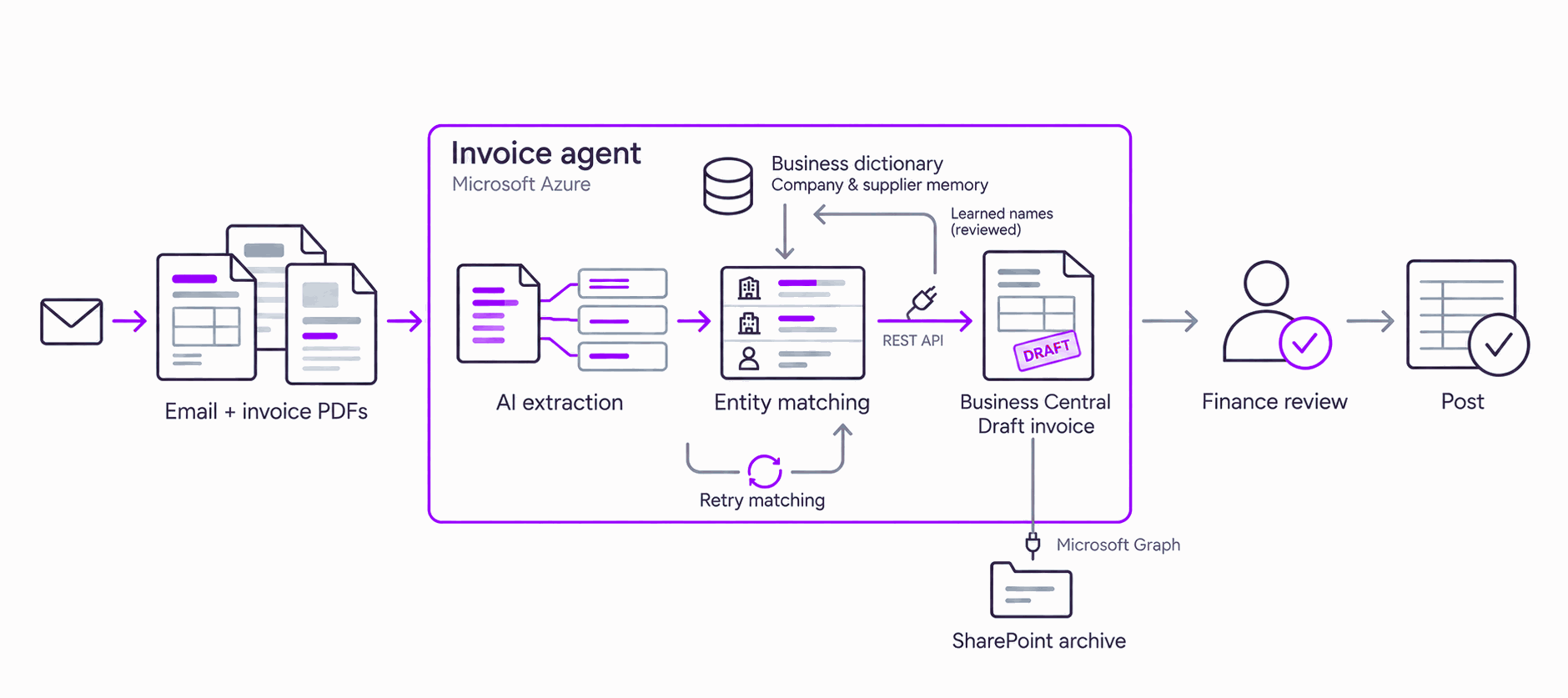
An AI agent reads invoices arriving by email, matches suppliers and prepares draft ERP entries. It handles credit memos, checks for duplicates and retries failed matches.
Where it runs
In the customer environment, connected to their ERP and document store. Credentials are held in a managed key vault. A status dashboard tracks every invoice.
Finance reviews prepared invoice entries instead of manually transcribing PDFs.
Live in production. Nothing posts without review.
Industry: energy shipping and distribution. Client details and metrics are shared after an NDA, to protect our clients’ interests.
From source to a reviewed answer, in three steps.
- 01
Invoice PDFs
Invoices and credit memos arrive by email.
- 02
AI prepares a draft
Extract details, match suppliers and check duplicates.
- 03
Finance reviews
Approve or return exceptions before posting to the ERP.
System capabilities
- Intake
- PDFs from email
- Duplicate checks
- Context
- AI extraction
- Business dictionary
- Tools
- ERP connector
- Document store
- Governance
- Finance-controlled posting
- Key vault credentials
- Operations
- Status dashboard
- Recovery guide
Discuss your invoice workflow.
Tell us how invoices are received, checked and posted today. We’ll help you identify a practical starting point.
founders@amotion.ai